
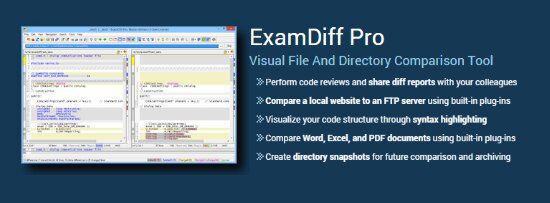
ExamDiff Pro is a robust file comparison tool designed to simplify the process of identifying differences between files and folders. This powerful software is ideal for developers, writers, and anyone who needs to manage files and collaborate with others. With its intuitive interface and comprehensive feature set, ExamDiff Pro makes it easy to compare and merge files, creating a unified version.
The software's capabilities extend to comparing a wide range of file types, including plain text files, HTML documents, XML files, and binary files. Its built-in editor allows for direct editing of files within the comparison panes, and the merge feature enables the combination of changes from multiple files into a single version. Additionally, ExamDiff Pro provides advanced features such as automated directory synchronization, line inspector panels, and the ability to filter out specific types of changes.
Key Features and Benefits
ExamDiff Pro offers a range of features that make file comparison and management efficient. Its side-by-side and top-down views enable easy identification of differences between files and directories. The software also supports one-click synchronization, allowing for automatic harmonization of changes between two files.
The ability to customize the program's colors, fonts, and behavior when encountering specific types of differences is another significant advantage. This level of customization enables users to tailor the software to their specific needs, enhancing productivity and streamlining file management tasks.
Advanced Comparison and Merge Capabilities
ExamDiff Pro's advanced comparison capabilities include the ability to perform two-way and three-way diff and merge operations. This functionality is particularly useful for managing complex file sets and collaborating with multiple team members. The software's ability to highlight differences down to the level of lines, words, or characters ensures precise comparison results.
Furthermore, ExamDiff Pro's support for fuzzy line matching and the recognition of moved text blocks enhances its comparison accuracy. These features are crucial for identifying and managing changes in large files and directories, making it an indispensable tool for software developers and writers.
Customization and Integration
The software offers extensive customization options, including the ability to specify which file types to ignore during comparison and to change the program's behavior when encountering certain types of differences. This level of flexibility allows users to adapt ExamDiff Pro to their specific workflow requirements.
In addition to its customization capabilities, ExamDiff Pro supports integration with other tools and services. Its built-in support for remote file comparisons enables seamless collaboration with team members and facilitates the management of files across different locations.
Enhanced Productivity with Automation
ExamDiff Pro includes several features designed to automate and streamline file comparison and management tasks. Automated directory synchronization and one-click synchronization are just a few examples of how the software can save time and reduce the effort required for file management.
The software also provides features like the line inspector panel, which facilitates easy recognition of differences within lines, and the ability to perform full file comparison in the background during directory comparison. These capabilities further enhance the software's productivity benefits.
Conclusion and Additional Features
In conclusion, ExamDiff Pro Master Edition 16.0.1.21 is a powerful and versatile tool for comparing, merging, and synchronizing files and folders. Its comprehensive feature set, intuitive interface, and outstanding performance make it an ideal choice for anyone who needs to manage files and collaborate with others efficiently.
Some of the key features and benefits of using ExamDiff Pro include:
- Comparison of text files, binary files, and directories
- Performance of two-way and three-way diff and merge
- Highlighting of differences down to the level of lines, words, or characters
- Support for fuzzy line matching and recognition of moved text blocks
- Automated directory synchronization and one-click synchronization