
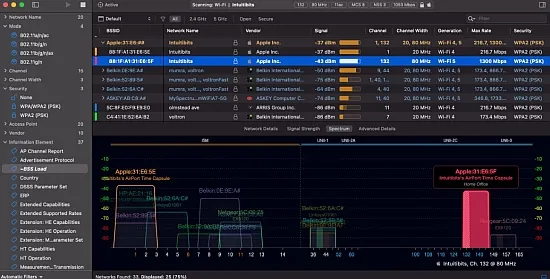
Intuitibits WiFi Explorer Pro is a comprehensive Wi-Fi analysis tool designed to provide in-depth insights into wireless networks. It offers a wide range of features that enable users to detect configuration issues, performance bottlenecks, and interference problems. The tool supports the latest Wi-Fi technologies, including Wi-Fi 4, 5, 6, 6E, and 7, and operates across 2.4, 5, and 6 GHz bands with wide channel bandwidths.
The primary goal of Intuitibits WiFi Explorer Pro is to surface raw technical details in a user-friendly and actionable format. The tool exposes hundreds of parameters, allowing users to customize the interface according to their specific needs. With its vendor-neutral approach, the tool is particularly useful in mixed-vendor environments and for consultants who work with different client networks.
Key Features and Benefits
Intuitibits WiFi Explorer Pro offers a range of features that make it an essential tool for Wi-Fi analysis. It supports multiple scan modes, including active, directed, and passive scans, allowing users to balance completeness, intrusiveness, and hardware limitations. The tool also provides a customizable interface, enabling users to create column profiles and pin critical fields for easy reference.
The tool's advanced details view decodes and describes information elements in beacons and probe responses, helping users troubleshoot issues like misconfigured 802.11k/v/r, band steering inconsistencies, or mismatched capabilities between APs. This feature is particularly valuable for WLAN engineers and IT administrators who need to optimize their wireless networks.
Scan Modes and Data Acquisition
Intuitibits WiFi Explorer Pro offers several scan modes to cater to different user needs. The active scan mode actively probes for networks, while the directed scan mode targets specific SSIDs or channels. The passive scan mode listens silently for beacons and management frames, ideal for more detailed and less intrusive analysis.
In addition to local scans, the tool can gather information via remote sensors or external USB Wi-Fi adapters. This multi-source approach enables users to perform quick on-site checks, remote monitoring, and post-hoc analysis from capture files. The tool's support for external adapters also allows users to see different chipsets and bands than the built-in radio can provide.
Visualization and Analysis
The central view of Intuitibits WiFi Explorer Pro is a table of detected networks accompanied by graphical visualizations. Networks can be organized and visualized in several ways, including by SSID, physical access point, or vendor. The tool also provides graphical plots to show channel occupancy and signal strength over time, making it easy to spot co-channel and adjacent-channel interference.
The tool's visualization capabilities are further enhanced by its coloring rules, which allow users to assign colors based on specific criteria. This feature makes complex environments visually readable at a glance. Users can also create custom column profiles and pin critical fields to simplify their analysis.
Advanced Features and Options
Intuitibits WiFi Explorer Pro offers several advanced features that cater to the needs of experienced users. These include custom filters, coloring rules, and labels and annotations. The tool also supports remote scanning and sensors, enabling users to gather data from locations that may be physically distant or difficult to access.
Some of the key features and benefits of Intuitibits WiFi Explorer Pro include:
- Support for multiple scan modes, including active, directed, and passive scans
- Customizable interface with column profiles and pinned critical fields
- Advanced details view for decoding and describing information elements
- Remote scanning and sensor support for gathering data from distant locations
Conclusion and Recommendations
Intuitibits WiFi Explorer Pro is a powerful tool for Wi-Fi analysis, offering a range of features that cater to the needs of WLAN engineers, IT administrators, and serious enthusiasts. Its customizable interface, advanced details view, and remote scanning capabilities make it an essential tool for optimizing wireless networks.
Overall, Intuitibits WiFi Explorer Pro is a valuable resource for anyone looking to improve their Wi-Fi network's performance and security. Its comprehensive feature set and user-friendly interface make it an ideal choice for both beginners and experienced users. With its support for the latest Wi-Fi technologies and wide range of features, Intuitibits WiFi Explorer Pro is a must-have tool for anyone working with wireless networks.