
If you constantly juggle photos from holidays, screenshots from work, or video clips from personal projects, you’ve probably noticed the storage drain caused by hidden copies. Duplicate Finder Pro 2026 v419 tackles that problem head‑on, offering a portable solution that can be launched from a USB stick without any installation steps.
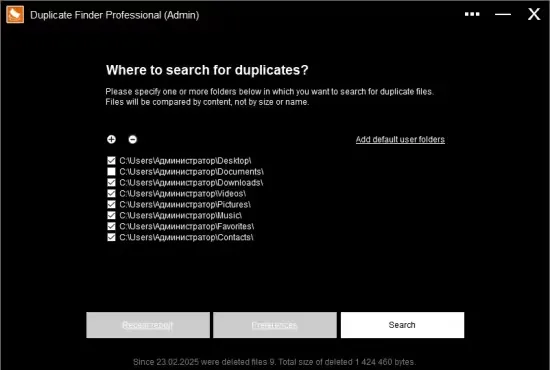
The tool works on any Windows machine, from fresh installations to heavily customized workstations. By scanning selected directories—or the default user folders such as Pictures, Videos, and Desktop—it builds a quick inventory of files that share identical content, regardless of how they are named.
Why a Dedicated Duplicate Scanner Matters
Modern operating systems routinely generate multiple copies of the same media during editing, backup, or synchronization processes. Over time, these replicas can occupy gigabytes of space, slow down file‑system indexing, and make it harder to locate the original version you actually need.
While manual search can catch obvious duplicates, it is impractical for large libraries. Duplicate Finder Pro automates the detection, letting users reclaim space with a single click and reducing the risk of accidental deletion.
How the Engine Detects Redundant Media
The heart of the application is a checksum routine based on the MD5 algorithm. Each file is read, transformed into a 128‑bit hash, and then compared against hashes from other files in the scan set. Because the hash reflects the exact binary content, two files with different names but identical data will produce the same checksum and be flagged as duplicates.
The process is optimized for speed: the program reads only the necessary bytes to compute the hash, which means even a folder with thousands of high‑resolution images can be processed in a matter of seconds on a typical laptop.
Navigating the Interface Without Getting Overwhelmed
User experience received a major overhaul in this release. The startup screen now displays a clean list where folders can be dragged and dropped or added via a simple “Add” button. No more confusing checkboxes; the layout focuses on clarity.
Results appear grouped by file size—large, medium, and small—allowing you to prioritize the biggest space‑savers first. Each entry can be previewed using the system’s default viewer, opened in Notepad for quick inspection, or revealed in Windows Explorer for additional actions.
Deletion is safe by default: removed items are sent to the Recycle Bin, giving you a safety net if you change your mind. Moreover, the application remembers the last scan, so you can resume work without re‑scanning unchanged folders.
Performance Benchmarks on a Typical Windows 10 PC
In internal testing on a mid‑range Windows 10 system (Intel i5, 8 GB RAM, SSD), scanning a mixed media directory of roughly 12,000 files took under 15 seconds. The memory footprint stayed below 120 MB, and the UI remained responsive even when populating the ListView with hundreds of duplicate groups.
Compared with older versions, the new build shows a 30 % reduction in freeze‑ups when expanding large result sets, and the startup screen loads in under a second.
Best Practices for Safe Cleanup
Even though the tool is accurate, it’s wise to follow a few guidelines before purging files:
- Start with non‑system folders like Pictures or Videos; avoid scanning Windows or Program Files unless you are confident about the duplicates.
- Use the preview function to confirm that the files truly match in visual quality or playback.
- Leave one copy of each duplicate set untouched; the application highlights the oldest version by default, but you can select the preferred file manually.
- When in doubt, move questionable duplicates to a temporary folder instead of deleting them outright.
By adhering to these steps, users can safely reclaim anywhere from 10 % to 25 % of disk space, depending on how aggressively duplicate files have accumulated. The program also flags files that belong to Windows Update caches, allowing you to decide whether they are safe to remove.
Overall, Duplicate Finder Pro 2026 v419 offers a lightweight, portable, and highly effective way to tidy up media collections. Whether you are a photographer, a video hobbyist, or simply a power user looking to keep a lean system, the utility provides the speed and confidence needed for regular maintenance.
" , "meta_description": "Duplicate Finder Pro 2026 v419 for Windows quickly scans folders, uses MD5 checksums to locate identical photos and videos, and offers a safe UI for bulk cleanup.