
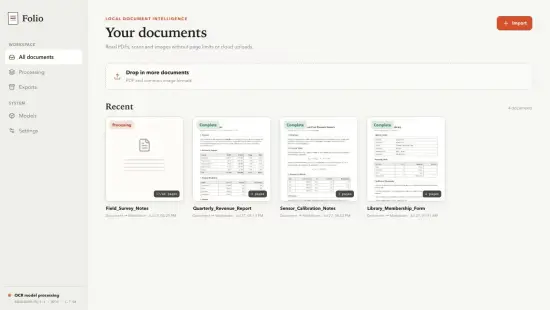
Imagine needing to turn a pile of printed invoices into searchable text while traveling between workstations. With Folio On-Device Document OCR 1.0.0 you can perform that conversion entirely on the computer you are using, without ever touching an external server. The tool focuses on turning photos, scans and screenshots into editable strings, keeping the whole process private and instant.
Because the application lives in a single folder that can be copied to any Windows machine, it fits naturally into environments where software installations are restricted or where users share public workstations. Its design targets professionals, researchers and hobbyists who regularly deal with paper‑based material but refuse to surrender their data to the cloud.
Why Local Processing Matters
Most OCR utilities forward images to remote services, wait for a response, and then hand the text back to the user. That model introduces latency, requires a stable internet link, and raises questions about where confidential information is stored. Folio’s engine stays inside the host PC, guaranteeing that every character stays where it originated unless the user explicitly exports it elsewhere.
Running the analysis locally also eliminates the variability caused by network congestion or server‑side updates. Whether you are handling a single receipt or a batch of archival documents, the processing time depends only on your hardware, not on external traffic spikes. This predictability is especially valuable for time‑sensitive projects such as legal discovery or academic transcription.
Engine Behind the Text Extraction
At the heart of the program lies a recognition model that evaluates the visual structure of each input image. It does more than match static templates; it assesses character contours, spacing patterns and background noise, allowing it to cope with skewed pages, low‑contrast prints, or mixed‑font layouts.
The algorithm strives to retain the original document’s logical flow. Line breaks, paragraph indents and simple table outlines are preserved whenever possible, so the resulting text requires minimal re‑formatting. This focus on structural fidelity makes the output feel like a true digital counterpart rather than a raw dump of characters.
Supported Image Sources
Folio accepts a broad spectrum of inputs: high‑resolution scans from flatbed devices, handheld phone photographs, screenshots taken from on‑screen PDFs, and even images saved from other applications. The program treats each file as a candidate for recognition, regardless of how pristine the source appears.
Because real‑world documents rarely arrive perfectly aligned, the software includes automatic deskewing and contrast‑enhancement steps. Whether you are digitizing a centuries‑old letter or capturing a quick snapshot of a meeting whiteboard, the engine adapts to the visual quirks and extracts readable text.
Privacy‑First Workflow
The on‑device nature of Folio directly addresses the privacy concerns that accompany cloud‑based OCR. Sensitive materials—financial statements, medical records, legal contracts—remain confined to the local file system. Users retain full authority over when and how the extracted data is shared.
This autonomy also simplifies compliance with strict data‑handling policies found in corporate or academic settings. By avoiding third‑party transmission, the tool sidesteps service‑level limits, unexpected API changes, and the need for additional encryption layers.
Best Practices for Accurate Scans
Even the most capable OCR engine benefits from clean source material. Below are a few tips that consistently improve recognition results when using Folio:
- Ensure the page lies flat and is well‑lit; shadows distort character edges.
- Capture images at a resolution of at least 300 dpi for printed text.
- Avoid extreme angles; a slight tilt can be corrected automatically, but severe perspective skews reduce accuracy.
- Crop out irrelevant borders or background objects before feeding the file to the OCR engine.
Following these guidelines reduces the need for post‑processing and lets the software deliver output that mirrors the original layout as closely as possible.
Overall, Folio On-Device Document OCR 1.0.0 offers a self‑contained solution for anyone who values speed, privacy and reliable text extraction. Its portable packaging, robust engine and straightforward workflow make it a practical addition to any Windows‑based document‑handling toolkit.
" , "meta_description": "Folio On-Device Document OCR 1.0.0 delivers offline text extraction for scans, photos and PDFs, preserving layout while keeping data private—convert documents instantly.