
Creating subtitles used to be a labor‑intensive chore, especially when the source material is lengthy or contains multiple speakers. Imagine a content creator who wants to add captions to a two‑hour interview without spending days typing line by line. The new AI Video to SRT 1.1.5 steps in as a self‑contained solution that turns that vision into reality.
Designed as a portable executable, the program runs directly from a USB stick or any folder without installation, making it ideal for on‑the‑go workflows. Its primary mission is to accept popular video containers—MP4, MKV, AVI, MOV, FLV—and output a clean SubRip (SRT) file that aligns each spoken phrase with an exact timestamp.
Turning Video Dialogue into Precise Subtitles
The conversion pipeline begins the moment a user drops a video into the intake pane. The engine extracts the audio track using a lightweight decoder that respects the original channel layout, whether stereo dialogue or a full surround mix. Once the sound is isolated, the AI‑driven speech recognizer takes over, converting acoustic signals into textual fragments.
After transcription, the software slices the raw text into subtitle‑sized blocks, typically limiting each line to 40 characters to keep on‑screen reading comfortable. It then assigns timestamps with frame‑accurate granularity, often down to a few milliseconds, ensuring the caption appears exactly when the word is uttered. The result is a standards‑compliant SRT file ready for any media player or editing suite.
How the Transcription Engine Handles Speech
At the heart of the program lies a proprietary automatic‑speech‑recognition (ASR) model paired with natural‑language‑processing (NLP) refinements. Trained on multilingual corpora that span podcasts, lectures, and cinematic dialogue, the model reports accuracy above 95 % on clear recordings. It automatically detects the spoken language—supporting more than a hundred tongues—and can be nudged toward specific dialects, such as British versus American English.
Background noise, music, or overlapping voices are mitigated through a beam‑search algorithm that isolates the dominant speaker. The system also performs diarization, labeling each segment as “Speaker 1,” “Speaker 2,” etc., which can later be edited. Post‑processing layers correct homophones, expand contractions, and insert punctuation, delivering a transcript that reads like a human‑written draft.
User‑Centric Interface and Editing Tools
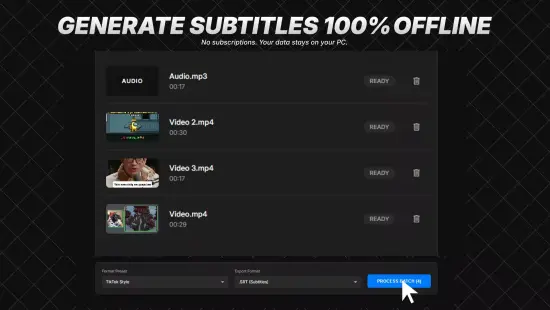
The graphical layout follows a three‑panel design: an Input zone for video drops, a Preview window that overlays generated captions on a scrubber, and an Output pane where users fine‑tune the SRT. Dark‑mode colors reduce eye strain, while resizable panels allow a full‑screen view for detailed editing.
A dual‑pane editor lets the user click any subtitle line to jump to its exact moment in the video, drag edges to adjust timing, or type corrections directly. Spell‑checking runs across dozens of languages, and a ripple‑edit function automatically shifts subsequent timestamps when a block is lengthened or shortened. Keyboard shortcuts—Space to play/pause, J/K/L for frame navigation, Enter for instant export—speed up the workflow.
Speed, Resource Use, and Batch Mode
Despite its sophisticated AI core, the application is optimized for consumer hardware. On a mid‑range CPU, a two‑hour documentary is processed in under ten minutes, while the optional GPU path can cut that time in half. Memory consumption stays modest, allowing multiple files to be queued simultaneously.
Batch mode introduces a queue manager where users can add whole folders, set priority levels, and watch progress bars for each job. The program distributes work across all available CPU cores and can tap into a compatible GPU for neural‑network inference, delivering a smooth, uninterrupted experience even when handling dozens of videos.
Fine‑Tuning Output and Export Options
Beyond the automatic generation, the tool offers extensive customization before saving the final file. Users may adjust the maximum characters per line, define a preferred reading speed measured in words‑per‑minute, or set vertical positioning for bilingual captions. The following options are available directly in the export dialog:
- UTF‑8 encoding to support international alphabets
- Line‑ending style selection (CRLF for Windows, LF for Unix)
- Optional markup such as italic for whispered speech or bold for on‑screen alerts
- Dual‑track generation for side‑by‑side multilingual subtitles
- Metadata fields for language codes, author notes, or version tags
A preview button renders the SRT in a miniature VLC‑like player, highlighting any timing drift before the file is committed. This safeguard helps creators catch errors that could otherwise frustrate viewers.
For professionals seeking alternatives, tools such as HandBrake and Subtitle Edit provide complementary workflows, but AI Video to SRT 1.1.5 distinguishes itself by combining portable execution, deep learning transcription, and a fully integrated editing suite in a single package.