
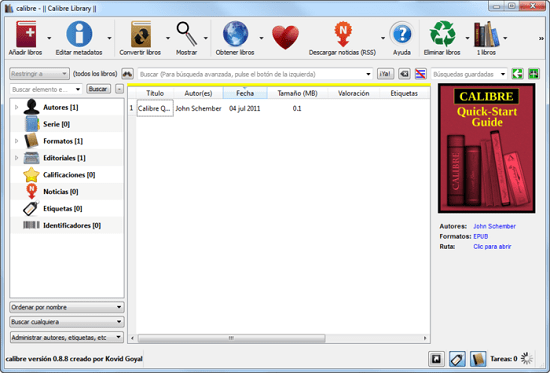
If you keep a growing collection of digital books on your laptop, tablet, or e‑reader, you’ve probably faced the headache of juggling dozens of file types and scattered folders. Calibre 9.13.0 offers a single, portable environment that tackles those challenges without demanding a permanent installation.
Designed for readers who treat their e‑library like a personal archive, this edition runs from a USB stick or a cloud‑synced folder, letting you pick it up on any compatible computer and continue where you left off.
Why e‑book enthusiasts choose Calibre
The core promise of Calibre is simple: turn a chaotic stack of files into a searchable, sortable catalogue. Whether you own a handful of novels or a multi‑gigabyte collection, the program indexes every entry and presents it through a clean grid that can be filtered by title, author, genre, or user‑defined tags.
Beyond basic sorting, the software lets you edit metadata such as cover art, publication dates, and series information, ensuring that each title displays correctly on every device.
Cross‑platform handling and system needs
Calibre 9.13.0 runs on Windows, macOS, and Linux, and the portable build inherits that flexibility. The package requires a modest 200 MB of free disk space and at least 2 GB of RAM for smooth operation, though larger libraries benefit from additional memory.
Because it is self‑contained, the program does not modify system registries or depend on external runtimes, making it safe for corporate or school computers where administrative rights are limited.
Organising massive libraries with custom tags
One of the most powerful aspects of Calibre is its tag system. Users can create bespoke categories—like “summer reads,” “research papers,” or “drafts”—and assign them to individual books. The tag cloud updates in real time, allowing you to locate a specific title with a few clicks.
Sorting can also be performed on numeric fields such as page count or rating, enabling quick discovery of the longest novel in a series or the highest‑scored mystery.
Built‑in reader and format conversion tools
Calibre ships with a native viewer that supports EPUB, MOBI, PDF, AZW3, and several lesser‑known formats. The interface offers adjustable font size, line spacing, and background color, so you can fine‑tune the reading experience without leaving the application.
Conversion is equally straightforward: select a book, choose a target format, and let the engine handle the rest. Batch conversion works for entire collections, making it possible to standardise a library to a single format before transferring to a new device.
- Amazon Kindle (any generation)
- Kobo Aura and Clara series
- Barnes & Noble Nook models
- Sony Reader devices
- Pocket‑sized Android e‑readers
Extending functionality through plugins
The ecosystem around Calibre includes a catalog of community‑maintained plugins. Users can install them directly from the preferences window, instantly adding new capabilities.
Two popular additions are the EpubMerge plugin, which stitches several EPUB files into a single volume, and the Quality Check plugin, which scans books for missing covers, broken links, or inconsistent chapter breaks. These extensions keep the core program lightweight while offering power‑user features on demand.
Because plugins run inside the same portable environment, they travel with your library wherever you go, guaranteeing a consistent workflow across multiple machines.
" , "meta_description": "Calibre 9.13.0 lets you organise, convert and sync e‑books on any PC. Manage metadata, use a built‑in reader and extend features with plugins.