
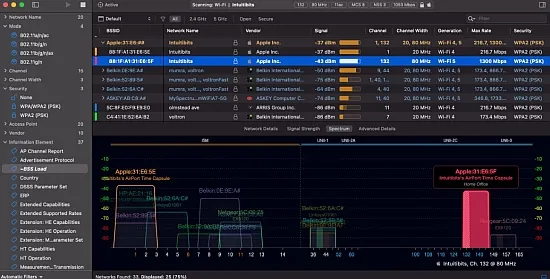
When a network specialist needs to untangle crowded airwaves, a tool that surfaces every nuance of an 802.11 signal becomes essential. Intuitibits WiFi Explorer Pro 1.2.5.0 delivers that depth while keeping the interface approachable for both seasoned engineers and advanced hobbyists.
Running on macOS and Windows, the application embraces the full spectrum of Wi‑Fi generations—from the classic 802.11n up through the emerging 802.11be (Wi‑Fi 7). Whether you are mapping a small office or a multi‑building campus, the scanner adapts to any radio stack your machine can expose.
Why Professionals Choose This Analyzer
The product’s core philosophy is to hand over the raw 802.11 fields without drowning the user in jargon. Hundreds of parameters—channel load, PHY mode, MCS index, spatial streams, security suites, and beacon elements—are presented as sortable columns, letting analysts pinpoint the exact metric that matters for a given issue.
Because the software does not tie itself to a specific vendor’s ecosystem, it works equally well in mixed‑brand environments. This neutrality makes it a favorite among consultants who hop between client sites that run equipment from Cisco, Aruba, Ubiquiti, or any other manufacturer.
Scanning Strategies and Hardware Options
Three distinct scan modes give users the flexibility to balance speed, thoroughness, and stealth:
- Active scan – broadcasts probe requests, revealing even weakly beaconing SSIDs in seconds.
- Directed scan – narrows the focus to specific channels or network names, ideal for deep dives on a single AP.
- Passive scan – quietly listens for management frames, perfect for hidden networks and non‑intrusive surveys.
Beyond the built‑in Wi‑Fi card, the program can ingest data from external USB adapters or remote sensors, expanding the observable frequency range and allowing engineers to capture data from hard‑to‑reach locations.
Turning Raw Data into Visual Insights
The central pane shows a table of detected networks, but the real power lies in the accompanying charts. Channel occupancy graphs instantly highlight co‑channel interference, while time‑based signal strength plots expose coverage holes. Users can switch the view to isolate 2.4 GHz, 5 GHz, or the newer 6 GHz band, making it simple to assess the impact of wide‑band channels up to 320 MHz.
Color‑coding rules let you paint rows based on any column—perhaps red for open networks, orange for legacy 802.11b rates, or blue for a specific vendor’s OUI. This visual cue system turns a dense spreadsheet into an at‑a‑glance health check.
Custom Columns and Deep‑Dive Details
On macOS the program offers more than 550 fields, while the Windows edition pushes that number past 850. Users can craft column profiles tailored to particular tasks—one for channel planning, another for security audits. Critical columns can be pinned, ensuring that SSID, BSSID, and channel remain visible while scrolling through advanced metrics.
The detailed view decodes information elements hidden inside beacons and probe responses, shedding light on 802.11k/v/r settings, band‑steering behavior, and advanced capabilities of Wi‑Fi 6/6E/7 devices. This depth makes troubleshooting mis‑configurations far more straightforward.
Remote Sensors and Capture File Integration
Intuitibits WiFi Explorer Pro can pull scan results from remote sensors or compatible access points, enabling engineers to monitor a floor’s RF environment from a central office. The remote data is treated exactly like a local scan, preserving all filtering and visualization options.
The application also accepts .pcap, .pcapng, and .pkt files, as well as CSV exports from tools such as AirPort Utility or Aruba Utilities. Importing these files transforms raw packet dumps into the familiar table and graph layout, allowing post‑event analysis without replaying each frame manually.