
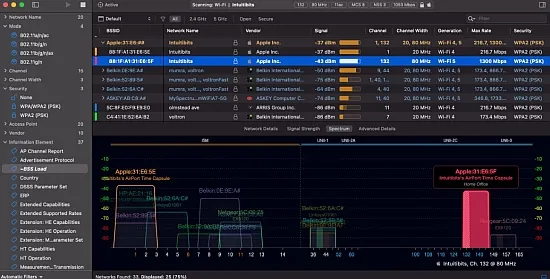
When a network engineer needs to peel back the layers of a Wi‑Fi deployment, a tool that surfaces every 802.11 detail without overwhelming the screen becomes essential. Intuitibits WiFi Explorer Pro 1.2.5.0 fills that niche, offering a portable, feature‑rich scanner that works on both macOS and Windows platforms.
The application is aimed at WLAN specialists, IT administrators, and power users who must locate mis‑configurations, performance bottlenecks, or hidden interference across 2.4 GHz, 5 GHz, and the newer 6 GHz spectrum. Its design philosophy embraces raw protocol data while keeping the interface sortable, filterable, and visually approachable.
Why professionals trust WiFi Explorer Pro
Unlike consumer‑grade sniffers that hide low‑level fields, this version displays anywhere from 550 to 850 columns depending on the operating system. Users can decide which parameters matter most—channel utilization, PHY mode, MCS, spatial streams, security suites, or beacon information elements—and hide the rest. The column‑profile system lets you save distinct layouts for site surveys, security audits, or capacity planning, ensuring that the same data set can be examined from multiple angles.
The tool is deliberately vendor‑neutral. It reads whatever the radio reports, whether the source is a built‑in MacBook antenna, a Windows USB stick, or a remote sensor. That neutrality makes it valuable for consultants hopping between client networks that may mix Cisco, Aruba, Ubiquiti, and other equipment.
Scanning approaches and hardware flexibility
WiFi Explorer Pro supports three distinct scan modes, each suited to a different investigative need. The Active scan pushes probe requests and quickly discovers even faint SSIDs. The Directed scan narrows focus to a specific channel or network name, saving time when you know where the problem lies. Finally, the Passive scan listens silently for beacons, ideal for detecting hidden networks and for low‑impact measurements.
- Active scan – fast, comprehensive discovery
- Directed scan – targeted channel or SSID investigation
- Passive scan – silent listening for hidden beacons
Beyond the internal radio, the program can ingest data from external USB adapters or from remote sensors that act as scanning probes. This means a field engineer can launch a local scan on a laptop, then later merge results from a ceiling‑mounted sensor without leaving the application.
Turning raw data into clear visual maps
The central workspace is a sortable table, but the real insight comes from the accompanying graphs. Channel occupancy charts display how many networks occupy each 20 MHz slice, while signal‑strength timelines reveal intermittent interference. Separate plots for the 2.4 GHz, 5 GHz, and 6 GHz bands help you spot cross‑band congestion at a glance.
Color‑coding rules let you paint rows based on any column—security type, vendor OUI, or channel width. For example, you might highlight every 40 MHz channel in the 2.4 GHz band in red, instantly exposing legacy configurations that could degrade performance.
Deep dive into the column architecture
On macOS the program offers more than 550 selectable fields; Windows users see upwards of 850. Columns cover everything from basic identifiers (SSID, BSSID, RSSI) to advanced information elements such as 802.11k/v/r support, band‑steering flags, and 802.11be capabilities. Users can pin crucial columns so they remain visible while scrolling through the extensive data set.
Custom profiles make it simple to switch contexts. A “Design” profile might surface channel width, primary/secondary frequency, and supported MCS rates, while a “Security” profile emphasizes authentication methods, encryption suites, and rogue‑AP detection flags. The flexibility eliminates the need to export data to a spreadsheet for routine analysis.
Extending analysis with remote sensors and capture imports
Remote scanning is built into the workflow. By connecting to a supported access point or a dedicated sensor, the same UI displays results as if the laptop performed the scan locally. This enables multi‑floor surveys, continuous monitoring, and post‑event forensics without physically moving the workstation.
The application also reads packet capture files (.pcap, .pcapng, .pkt) and CSV exports from other utilities. Engineers can drop a Wireshark capture into the program and instantly view a high‑level map of networks, saving hours of manual parsing. Similarly, CSV exports from tools like AirPort Utility or Aruba Analytics can be imported, granting access to WiFi Explorer Pro’s powerful filtering and visualization engine.
" , "meta_description": "Intuitibits WiFi Explorer Pro 1.2.5.0 delivers detailed 802.11 analysis, multi‑band scanning, and customizable columns for IT pros to diagnose Wi‑Fi issues fast.