
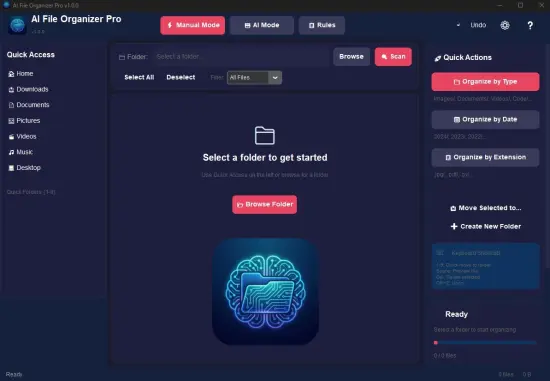
The modern digital landscape is characterized by an overwhelming abundance of files, making it challenging to maintain a well-organized digital footprint. This is where the Portable AI File Organizer Pro 1.0.0 steps in, offering a sophisticated solution that leverages artificial intelligence to categorize, structure, and manage files with minimal user intervention.
By running entirely offline, this privacy-focused tool ensures that sensitive data remains secure. It scans folders, analyzes content across various file types, and proposes intelligent organization schemes, making it an indispensable asset for professionals, creative teams, and individuals seeking to reclaim control over their digital storage.
Core Functionality
At the heart of the Portable AI File Organizer Pro 1.0.0 is its advanced local large language model integration. This powerful engine processes files without uploading data to the cloud, ensuring maximum privacy and security. Upon selecting a target directory, the software employs multimodal AI to extract metadata, text content, and visual elements.
This sophisticated approach enables the software to identify clusters of related files, such as invoice PDFs, and group them under appropriate categories like 'Finances/2026/Invoices', renaming each file descriptively for easy retrieval.
Intelligent Folder Structuring
Unlike traditional rule-based sorters, the Portable AI File Organizer Pro 1.0.0 dynamically generates hierarchical structures tailored to the content. It proposes trees that mirror real-world organizational needs, such as 'Projects/ClientA/Contracts' or 'Personal/Photos/Year/Month/Event'.
Users can preview these structures in a collapsible navigator, making adjustments as needed. The software also suggests expansions based on patterns, allowing for a highly customized and intuitive file system.
Advanced Features
The Portable AI File Organizer Pro 1.0.0 offers a range of advanced features designed to enhance the user experience. These include the ability to watch folders for new arrivals, auto-organizing them in real-time or scheduled sweeps, and support for custom templates to enforce consistency across drives.
For teams, shared templates can be used to maintain uniformity, with conflict resolution prioritizing timestamps or manual overrides. This ensures that collaborative projects remain organized and easily accessible.
File Renaming and Metadata Enhancement
The software's renaming capabilities elevate from cosmetic to functional, crafting descriptive and consistent names that incorporate dates, categories, keywords, and sequence numbers. A rules engine supports regex patterns, prefixes/suffixes, and bulk find-replace, all of which are AI-suggested but fully editable.
Metadata injection enriches files by embedding custom tags, updating EXIF for images, or standardizing titles in Office documents. A duplicate finder employs perceptual hashing, catching near-identical photos and proposing merges or versions.
Efficiency and Customization
The Portable AI File Organizer Pro 1.0.0 is designed to be efficient and customizable. It supports batch processing, handling thousands of files across terabytes with multi-threaded analysis and optional GPU acceleration for image-heavy sets. Real-time progress dashboards provide parsing stats, folder predictions, and ETA.
Users can customize the software's behavior through a range of options, including:
- Setting up watch folders for continuous monitoring
- Creating custom templates for specific projects or clients
- Adjusting the AI's confidence threshold for suggestions
- Enabling or disabling specific features to suit individual needs