
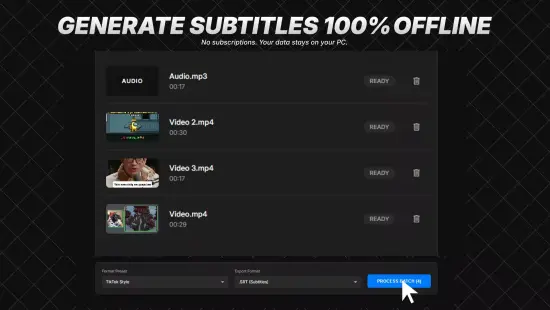
In today’s multimedia landscape, accurate subtitles are essential for accessibility, SEO, and audience retention. Traditional manual captioning can be labor‑intensive, error‑prone, and costly, especially for creators handling large volumes of content. The solution emerges in a modern desktop utility that leverages artificial intelligence to automate the entire subtitle pipeline, delivering results that rival professional transcribers while dramatically cutting turnaround time.
The application ingests common video containers, extracts the embedded audio with lossless fidelity, and then runs a sophisticated speech‑to‑text engine. Within minutes, it produces a clean, editable SubRip (SRT) file that aligns perfectly with the source video, ready for immediate deployment on platforms such as YouTube, Vimeo, or any editing suite.
Streamlined Import and Audio Extraction
Users begin by dragging video files—whether MP4, MKV, AVI, MOV, or FLV—into a dedicated drop zone. The program instantly decodes the container, isolates the audio track, and preserves the original bitrate, ensuring that subtle tonal nuances remain intact for downstream processing. This extraction phase operates on both stereo and multi‑channel mixes, making it suitable for everything from interview recordings to cinematic surround‑sound mixes.
Behind the scenes, optimized codecs minimize CPU load, allowing the utility to run on modest laptops without sacrificing speed. The extracted audio is then handed off to the AI core, which begins transcription while the user can continue working on other tasks, thanks to a non‑blocking background thread that updates progress in real time.
AI-Powered Transcription Engine
The heart of the system is a proprietary automatic speech recognition model trained on diverse multilingual corpora, including podcasts, lectures, and film dialogues. It can automatically detect the spoken language or be manually set for dialect‑specific nuances, delivering over 95 % word‑level accuracy on clear recordings. Advanced beam‑search and noise‑suppression algorithms isolate speech even in bustling environments, while speaker diarization tags each voice segment for easy identification.
- Supports more than 100 languages and regional dialects
- Robust noise filtering for crowded or reverberant settings
- Automatic speaker labeling with customizable tags
- Context‑aware punctuation and capitalization
- On‑the‑fly adaptation to technical vocabularies
After the initial pass, a secondary natural‑language processing layer refines the output, correcting homophones, expanding contractions, and smoothing grammar. Confidence scores are attached to each word, enabling users to focus manual review on low‑certainty segments, thereby preserving the speed advantage of automation while ensuring high editorial standards.
Precision Subtitle Timing and SRT Generation
Timing accuracy is achieved through word‑level alignment that maps phonetic cues to video frames, producing timestamps with sub‑100 ms precision. The engine automatically splits the transcript into subtitle blocks that respect readability guidelines—typically one to two lines, under 40 characters each—while also respecting maximum display durations to prevent viewer fatigue.
The generated SRT adheres strictly to the SubRip specification, including sequential numbering, HH:MM:SS,mmm timestamps, and optional styling tags for emphasis or positioning. Users may adjust line‑length limits, reading speed, or vertical placement, and can even produce dual‑language files with side‑by‑side translations, all exported in UTF‑8 to support global character sets.
In-Depth Editing and Customization Tools
A dual‑pane editor synchronizes video playback with the transcript, allowing a single click on any subtitle line to jump to its exact moment. Timing tweaks are performed by dragging block edges, while textual edits update instantly in a live preview. Integrated spell‑check and grammar analysis, powered by Hunspell dictionaries, catch typographical errors across multiple languages.
Advanced features include ripple edits that propagate timing changes downstream, merge/split utilities for block management, and regex‑based search‑and‑replace for bulk modifications. Annotation layers let users add invisible notes, and an unlimited undo/redo stack safeguards against accidental loss. Export previews simulate playback on popular players, flagging any residual sync drift before finalizing the file.
Batch Processing and Workflow Automation
For power users handling large libraries, the batch mode queues dozens of videos, automatically applying pre‑saved templates that encapsulate language, speed, and formatting preferences. The engine distributes work across all CPU cores and can optionally tap into GPU acceleration, dramatically reducing per‑file processing time.
Priority queues let urgent projects jump ahead, while pause‑and‑resume functionality ensures that interruptions do not corrupt the pipeline. Comprehensive progress dashboards display real‑time statistics, and the final SRT files are written to a user‑defined directory structure, ready for immediate upload or further post‑production work.