
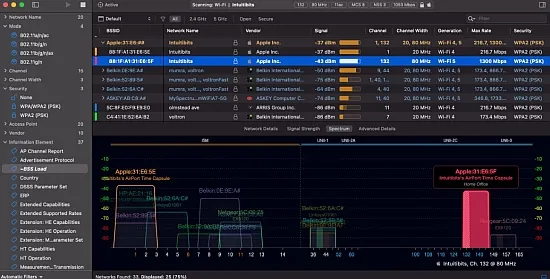
The tool serves as a high‑level scanner for professionals who need to understand every nuance of a wireless environment. It targets network engineers, IT administrators, and seasoned hobbyists who require more than a simple signal meter, delivering a comprehensive view of signal strength, channel usage, and protocol details across a range of deployments from home offices to large campuses.
Version 1.2.0.0 expands support to the newest Wi‑Fi generations, covering legacy 802.11n through the emerging 802.11be standard. It operates on the 2.4 GHz, 5 GHz, and 6 GHz spectra, handling channel widths up to 320 MHz, which makes it suitable for both older equipment and the latest high‑throughput access points.
Core Capabilities and Data Depth
Unlike many consumer‑grade utilities, the application surfaces raw 802.11 fields directly to the user. Hundreds of parameters—such as PHY mode, MCS index, spatial streams, security suites, and beacon information elements—are available for inspection, allowing precise identification of configuration errors or performance bottlenecks. The data model is vendor‑agnostic, focusing solely on what the radio and beacon frames reveal.
To keep this wealth of information manageable, users can build column profiles that select a subset of fields relevant to a specific task. Profiles can be saved, shared, and quickly swapped, turning a massive data set into a focused workspace for design reviews, security audits, or troubleshooting sessions.
Supported Standards and Platform Compatibility
The macOS edition runs natively on both Apple Silicon and Intel processors, automatically detecting the capabilities of the built‑in Wi‑Fi chipset. It supports 802.11a/b/g/n/ac/ax/be, handling channel allocations of 20, 40, 80, 160, and 320 MHz across the three primary bands. The Windows version mirrors this feature set, provided the underlying drivers expose the same radio features.
Both platforms gracefully accommodate external adapters, enabling users to attach USB radios that expose additional frequency ranges or higher‑performance chipsets. This flexibility ensures that the same workflow can be applied whether the scan originates from a laptop’s internal antenna or a specialized external probe.
Scanning Techniques and Remote Data Sources
Three primary scan modes let users balance speed, thoroughness, and intrusiveness. An active scan quickly probes the air, uncovering even weakly advertised networks. Directed scans focus on specific SSIDs or channels, ideal for deep dives into a single deployment. Passive scans listen silently to beacons and management frames, preserving the radio environment and revealing hidden networks without transmitting.
Beyond local radios, the solution can ingest data from remote sensors or access points that act as scanning probes. Engineers can connect to USB‑based adapters, dedicated sensor nodes, or cloud‑linked APs, allowing site surveys from a distant workstation and enabling multi‑point correlation across floors or buildings.
Visualization Tools and Custom Columns
The main interface presents a sortable table of detected networks, enriched with graphical plots that illustrate channel occupancy, signal trends, and bandwidth usage. Users can group entries by SSID, physical radio, or vendor OUI, instantly revealing how a single network is distributed across frequencies or which manufacturers dominate the spectrum.
- Channel heat‑maps that highlight congested frequencies.
- Signal‑strength timelines for each BSSID.
- Bandwidth width overlays showing 20 MHz, 40 MHz, 80 MHz, and wider allocations.
- Color‑coding rules that flag insecure protocols or legacy rates.
Custom columns can be pinned so essential fields—such as SSID, BSSID, channel, and RSSI—remain visible while scrolling through the extensive data set. Sorting and filtering on any column turn the table into a dynamic analysis grid, empowering users to isolate problem areas with a few clicks.
Advanced Filtering, Rules, and Export Options
The application includes a powerful rule engine that lets users define logical filters on any field, for example “show only open networks on channels above 100 MHz” or “highlight devices using legacy 802.11b rates.” Coloring rules apply visual cues to rows that meet these conditions, making outliers pop out instantly. Annotations can be attached to individual entries, preserving notes such as “relocate AP to channel 36” for future reference.
Captured data can be imported from .pcap, .pcapng, or .pkt files, as well as CSV exports generated by other Wi‑Fi utilities. This capability lets analysts transform raw packet captures into the same high‑level visualizations and filters used for live scans, facilitating post‑mortem investigations or cross‑tool comparisons without leaving the application.
" , "meta_description": "Intuitibits WiFi Explorer Pro 1.2.0.0 delivers Wi‑Fi analysis for macOS and Windows, supporting Wi‑Fi 4‑7 with flexible scans, charts, and advanced filtering.