
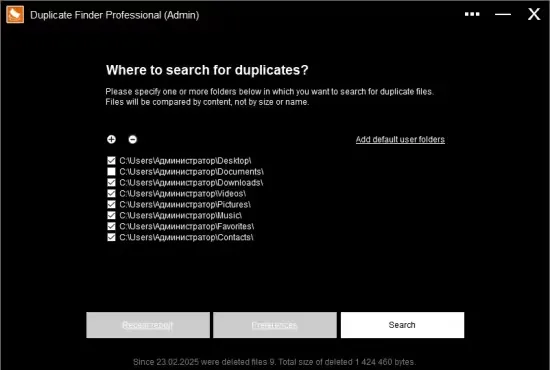
If you’ve ever stared at a cluttered hard drive wondering why space disappears so quickly, you’re not alone. Photos taken on a weekend trip, video clips from a family event, and system‑generated updates can multiply without you noticing, leaving a maze of redundant files.
Duplicate Finder Pro 2026 v420 tackles that problem head‑on. Designed as a fully portable utility, the program slips onto a USB stick and scans any folder you point it to, from your Documents library to a deep‑nested media archive.
How the scanner identifies identical media
The core of the engine relies on MD5 hashing, a technique that converts each file’s binary content into a unique 128‑bit fingerprint. Two files that share the same fingerprint are guaranteed to be byte‑for‑byte identical, regardless of their filenames or timestamps.
Because the comparison happens at the data level, the tool can spot duplicates even when one copy has been renamed, moved, or compressed with a different container. The process finishes within seconds for typical user folders, thanks to the lightweight 1.5 MB executable.
Navigating the grouped results
When the scan concludes, results appear in three logical clusters: large, medium, and small files. This categorisation helps you prioritize which duplicates to review first, especially when dealing with gigabyte‑size video files.
Each group can be expanded or collapsed with a single click. Inside, the program presents a thumbnail preview for images and a quick‑play snippet for videos, allowing you to verify content without leaving the interface. You can also open the folder location in Windows Explorer or launch the default viewer for a closer look.
Managing deletions safely
Once you’ve decided which copies are expendable, the utility offers a safe‑delete workflow. Selected items are moved to the Windows Recycle Bin, giving you a grace period to restore anything that was mistakenly removed.
The application remembers the last scan session, so you won’t need to repeat the analysis if you close the program and come back later. This persistence feature saves both time and CPU cycles, especially on machines that run frequent updates.
Performance on modest hardware
Duplicate Finder Pro 2026 v420 was compiled with the latest optimization flags, allowing it to run smoothly on computers as modest as a dual‑core processor with 2 GB of RAM. In a test on a Windows 10 workstation, the tool uncovered roughly 23 % duplicate content within the system folder, reclaiming over 1 GB of space in under a minute.
Because the program is portable, it does not write to the registry or require installation, meaning it leaves no footprint on the host system. This makes it an ideal candidate for IT technicians who need to clean multiple machines without deploying additional software.
Best practices and cautionary notes
While the scanner excels at locating redundant media, users should exercise care when targeting system directories. Some duplicates belong to Windows Update packages and may be required for future rollbacks.
- Run a quick scan on non‑system folders first to get comfortable with the UI.
- Use the preview feature before deleting any file larger than 100 MB.
- Keep a recent backup or rely on the Recycle Bin for recovery.
- Avoid deleting files that are part of active applications.
- Consider pairing the tool with a dedicated cleaner like CCleaner for comprehensive maintenance.
By following these guidelines, you can safely reclaim valuable disk space while minimizing the risk of accidental data loss.