
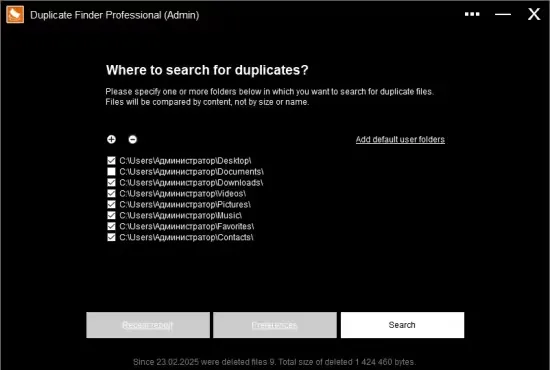
If you constantly juggle photos from vacations, screenshots from work, and video clips from family gatherings, you’ve probably noticed that your hard drive starts to feel cramped. Duplicate files silently eat up space, slow down backups, and make it harder to locate the original version of a media item. Duplicate Finder Pro 2026 v420 offers a purpose‑built solution that zeroes in on identical pictures and videos, helping Windows users reclaim valuable storage with minimal effort.
The utility runs directly from a USB stick or any folder without a traditional installation, which means you can launch it on multiple PCs without leaving a footprint. Its multilingual interface supports a broad audience, and the latest build adds a handful of quality‑of‑life tweaks that streamline the scanning workflow.
Why a Dedicated Duplicate Scanner Matters
Modern operating systems already provide basic search capabilities, yet they lack the depth required to compare file contents byte by byte. Relying on file names alone often leads to false positives or missed copies, especially when media files have been renamed during editing. A dedicated scanner examines the actual data, ensuring that only true duplicates are flagged.
Beyond saving disk space, removing redundant media reduces the time needed for file‑system indexing, speeds up antivirus scans, and makes cloud sync services more efficient. For users who back up large libraries to external drives or online storage, eliminating duplicates can shave hours off each backup cycle.
Scanning Engine and Accuracy
At the heart of Duplicate Finder Pro lies a hash‑based comparison algorithm. Each file is processed through the MD5 hashing routine, which generates a unique fingerprint based on the file’s binary content. Two files that share the same hash are virtually guaranteed to be identical, regardless of their filenames, timestamps, or metadata.
The program lets you point it at any directory—whether it’s a custom folder on an external drive or a standard user location such as “Pictures” or “Videos”. Once you start the scan, the engine reads each file once, computes its hash, and stores the result in memory. Because the algorithm works on raw data, the process typically finishes within seconds, even for libraries containing thousands of high‑resolution images.
Navigating Results with a Streamlined Interface
The user interface is designed to keep the experience calm, even when the scan uncovers hundreds of duplicate groups. Files are automatically clustered by size category—large, medium, and small—so you can prioritize which sets to review first. Clicking a group expands a preview pane that shows thumbnails for images or a quick playback snippet for videos.
- Open the file in the default viewer to verify its visual content.
- Reveal the file’s location in Windows Explorer for additional context.
- Send the selected duplicate to the Recycle Bin, allowing a safety net in case of accidental removal.
The application also remembers the outcome of previous scans, so you don’t need to repeat the entire analysis after each cleanup session. This state‑preserving feature is handy for users who prefer to work in short bursts rather than tackling the whole library in one go.
Performance Tips and System Impact
While the tool is lightweight—its portable package weighs roughly 1.5 MB—it still benefits from a few best‑practice settings. Running the scan on a solid‑state drive dramatically reduces read latency, especially when the dataset includes many large video files. If you’re scanning a network share, consider limiting the search to a single folder at a time to avoid overwhelming the connection.
The latest release (v420) includes compiler optimizations that shave milliseconds off hash calculations, and a bug fix that prevents the occasional secondary window from popping up when you adjust settings. Users have reported that the program closes cleanly without the rare crash that affected earlier builds.
For power users who need to compare two distinct libraries, the “Recent Folders” history can be disabled in the settings, ensuring that no path information is stored on the host machine. This privacy‑focused option aligns the tool with corporate policies that restrict persistent logs.
Overall, Duplicate Finder Pro 2026 v420 offers a balanced mix of speed, accuracy, and user‑friendly controls. Whether you’re a photographer curating a personal archive, an IT professional cleaning up workstation images, or a casual user looking to free up a few gigabytes, the program delivers measurable results without demanding a steep learning curve.
" , "meta_description": "Duplicate Finder Pro 2026 v420 quickly locates identical pictures and videos using MD5 hashing, offering an intuitive interface and safe removal options for Windows users.