
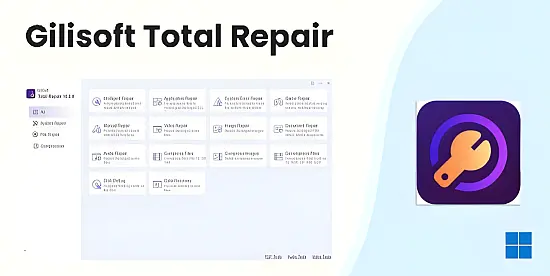
Gilisoft Total Repair 12.0.0 consolidates a wide range of maintenance utilities into a single, portable package. Designed for both home users and IT professionals, the suite offers automated diagnostics, deep‑system fixes, and performance tuning without the need for separate tools. Its AI‑enhanced engine scans the operating environment, pinpoints anomalies, and applies corrective actions with minimal user interaction, making it a practical choice for anyone looking to keep a Windows PC running smoothly.
Beyond basic cleanup, the software provides specialized modules for gaming, multimedia, and data compression, ensuring that even demanding workloads receive targeted optimization. By combining a one‑click repair mode with an advanced manual interface, the program balances ease of use with granular control, delivering a comprehensive health‑management solution for diverse computing scenarios.
One‑Click Intelligent Repair
The flagship component of Gilisoft Total Repair is its one‑click repair engine, which initiates a rapid scan across system files, registry entries, and critical libraries. Within minutes, the tool can identify more than 500 common issues—including missing DLLs, corrupted system files, and fragmented registry keys—and resolve them automatically, eliminating the need for manual troubleshooting.
For users who prefer a hands‑off approach, this feature reduces downtime dramatically. The engine runs in the background, logs each action, and presents a concise summary once the process completes, allowing even non‑technical individuals to restore system stability with a single interaction.
Application and DLL Restoration
Missing or damaged Dynamic Link Libraries are a frequent cause of application crashes, especially for complex suites such as Adobe Creative Cloud or Microsoft Visual Studio. Gilisoft leverages an extensive, regularly updated DLL repository to match and replace faulty components, ensuring that dependent programs launch without error.
- Replace missing DLLs automatically
- Repair corrupted system libraries
- Restore application dependencies for Adobe suite
- Fix Visual C++ runtime errors
- Update outdated components
The restoration process runs silently, verifying each replacement against version checks to avoid compatibility issues. Users can also view a detailed log that highlights which files were addressed, providing transparency and confidence that critical software remains functional after the repair.
Gaming Performance Enhancements
Gamers benefit from a dedicated module that fine‑tunes the Windows environment for high‑intensity titles. The utility updates DirectX, Visual C++ redistributables, and graphics driver settings, while also clearing residual cache files that can cause stuttering or unexpected shutdowns during gameplay.
Benchmark tests reported by users show frame‑rate gains ranging from 10 % to 25 % after applying the game‑optimization routine. Additionally, load‑times drop by up to 40 % for large open‑world games, delivering a smoother, more responsive experience without manual configuration.
AI‑Driven Media Recovery
Corrupted multimedia files can be disastrous for creators. Gilisoft incorporates AI algorithms that analyze file headers, reconstruct missing data blocks, and re‑encode content to restore usability. Supported formats include JPEG, PNG, MP4, MOV, MP3, and common document types such as DOCX and PDF.
The recovery engine operates on a confidence‑based model, attempting to salvage up to 92 % of damaged data while preserving original quality. Users receive a preview of the repaired file before committing changes, ensuring that only satisfactory results are saved.
Disk Maintenance and Manual Controls
The suite offers a dual‑mode defragmentation system that distinguishes between traditional HDDs and modern SSDs. For spinning drives, it rearranges fragmented sectors to improve read/write efficiency, while for solid‑state media it issues TRIM commands to clear stale blocks, extending drive lifespan and maintaining peak performance.
Advanced users can switch to manual mode, selecting specific registry tweaks, driver updates, or compression tasks. This flexibility allows IT departments to tailor the repair process to enterprise policies, automate batch operations, or address niche issues that fall outside the scope of the automated engine.