
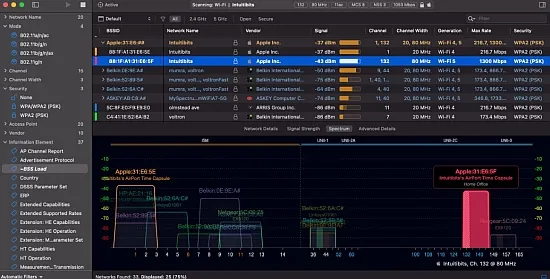
WiFi Explorer Pro is a comprehensive Wi-Fi analysis tool designed to provide in-depth visibility into wireless environments. It offers a wide range of features that enable users to detect configuration issues, performance bottlenecks, and interference problems across various network deployments.
The tool supports the latest Wi-Fi technologies, including Wi-Fi 4, 5, 6, 6E, and 7, and operates across 2.4, 5, and 6 GHz bands with wide channel bandwidths. This makes it suitable for both legacy and cutting-edge networks, allowing users to analyze and optimize their wireless infrastructure.
Key Features and Benefits
WiFi Explorer Pro offers a range of features that make it an essential tool for Wi-Fi analysis. It provides a clear and customizable interface that allows users to quickly detect configuration issues and performance bottlenecks.
The tool is vendor-neutral and focuses on providing raw technical detail in a form that is approachable and actionable. This makes it especially useful in mixed-vendor environments and for consultants who move between different client networks.
Supported Platforms and Standards
WiFi Explorer Pro supports a range of platforms, including macOS and Windows. It is optimized for Apple Silicon and Intel, and supports Wi-Fi 4 through Wi-Fi 7, along with 20, 40, 80, 160, and 320 MHz channels in the 2.4, 5, and 6 GHz bands.
The tool is designed to work with 802.11a/b/g/n/ac/ax/be networks and adapts to whatever the host platform’s Wi-Fi stack and external adapters can see. This ensures that the same conceptual workflow applies whether the user is on a MacBook or a Windows laptop.
Scan Modes and Data Acquisition
WiFi Explorer Pro offers several scan modes that allow users to balance completeness, intrusiveness, and hardware limitations. The tool can gather information via local scans, remote sensors, or external USB Wi-Fi adapters.
The following scan modes are available:
- Active scan: Actively probes for networks by sending requests.
- Directed scan: Targets specific SSIDs or channels.
- Passive scan: Listens silently for beacons and management frames.
- Remote scan: Connects to remote sensors or supported access points.
Visualization of the Wi-Fi Landscape
The central view of WiFi Explorer Pro is a table of detected networks accompanied by graphical visualizations. Networks can be organized and visualized in several ways, including by SSID, physical access point, or vendor.
Graphical plots show channel occupancy and signal strength over time, making it easy to spot co-channel and adjacent-channel interference, overlapping networks, and coverage gaps. Separate graphs can highlight 2.4, 5, and 6 GHz activity.
Column System and Expert Detail
A key strength of WiFi Explorer Pro is its detailed column system. The tool provides over 550 available fields on macOS and over 850 on Windows, covering everything from basic SSID and RSSI to fine-grained information elements.
Users can create custom column profiles, pin columns, and sort and filter on any column, turning the table into a flexible analysis grid. The advanced details view goes deeper by decoding and describing information elements in beacons and probe responses.