
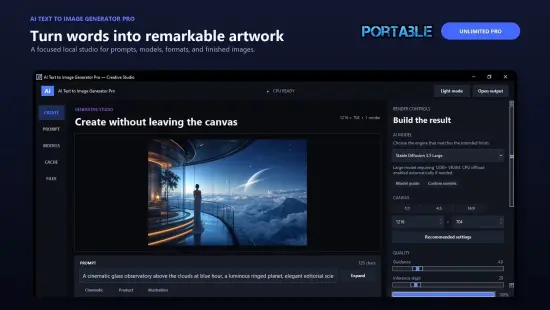
Imagine being able to describe a scene in a few words and watching a high‑resolution picture appear on your screen, all without an internet connection. AI Text To Image Generator Pro 1.2.5 brings that capability to Windows desktops, giving artists, designers, and curious hobbyists a self‑contained studio for visual experimentation.
The program runs entirely on the local machine, which means your prompts, drafts, and final renders never leave the hardware you own. This design choice satisfies privacy‑conscious creators while also eliminating the latency and subscription fees typical of cloud‑based generators.
The bundled collection includes several of the most respected diffusion models in the community. Whether you aim for lifelike portraiture, stylized manga characters, or sweeping fantasy vistas, a dedicated model is ready to interpret your description.
- Flux – a versatile model known for balanced realism and artistic flair.
- Stable Diffusion – the open‑source workhorse that excels at detailed compositions.
- Juggernaut XL – tuned for ultra‑sharp photorealistic output.
- Animagine XL – specialized in vibrant anime‑style illustrations.
Beyond the pre‑installed options, the platform accepts any model compatible with the Diffusers library, allowing you to pull additional checkpoints from the Hugging Face Hub and expand the creative palette.
Fine‑Tuning Parameters for Precise Output
Control over the generation process is exposed through a set of advanced sliders and numeric fields. Users can adjust image dimensions, the guidance scale (often called CFG), the number of inference steps, and a seed value that guarantees reproducibility.
- Image Size – define width and height in pixels for custom canvas dimensions.
- Guidance Scale – balance between adhering to the prompt and artistic freedom.
- Inference Steps – higher counts typically yield finer detail at the cost of longer render times.
- Seed – reuse the same numeric seed to recreate an identical image later.
These knobs let novices start with the recommended presets while giving power users the latitude to experiment with exotic configurations, achieving everything from crisp product mock‑ups to dreamy abstract concepts.
Workflow and Interface Design
The UI follows a clean, column‑based layout that groups prompts, model selection, and parameter panels logically. A single click on the “Generate” button launches the diffusion process, and a preview window updates in real time as the image materializes.
For users who prefer a guided experience, the software offers one‑click preset configurations tailored to each bundled model. Selecting a preset automatically fills the optimal values for resolution, steps, and guidance, enabling rapid iteration without manual tweaking.
System Requirements and Performance Tips
The application runs on Windows 10 or newer. Minimum specifications include a 64‑bit CPU, 8 GB of RAM, and at least 10 GB of free storage for model files. While the engine can operate on CPU alone, a modern GPU with at least 4 GB VRAM dramatically reduces generation time.
To maximize speed, keep the model cache on an SSD and close unnecessary background programs. If you encounter memory constraints, lower the image resolution or reduce the inference step count. The built‑in privacy safeguards ensure that even when the system runs at full throttle, no data is transmitted beyond your machine.